FAQs
AlignMyCareer is a tech start-up that provides the perfect meeting place for recruiters and job-seeking candidates. Our unique platform enables candidates to showcase their skill levels across the globe, irrespective of which educational institution they come from, as a part of our disruptive ‘equal opportunities for all’ mission. On our platform, candidates take assessments and keep on improving their skill sets, upgrading their employability. As soon as a candidate creates a profile, they can add a self-assessed skill rating, displayed as “Not Verified”, which simply means that we have not verified their skill level. Once the candidate takes our assessments, they are shown as “AMC Certified”. At the same time, with a simple search on our platform, recruiters are able to quickly find the right candidates with the specific skills of their requirement. This is not just a massive time-saver, but also saves huge amounts of resources, effort and time. Yes, we are different! We know the pain and we are here to disrupt that.
Below are the skill levels present currently in the increasing order of proficiency:
- Beginner
- Intermediate
- Proficient
- Expert
Below are the skill levels present currently in the increasing order of proficiency:
- Beginner
- Intermediate
- Proficient
- Expert
- Reducing time to a fraction: No wait time; get candidates' list instantly with exact matching of skill level, through a simple search query, or when you post a job.
- Saving precious efforts: Candidates we provide are productive on Day 1; Zero or minimal technical training required
- Saving cost to the company: Through us, you get candidates equipped with fundamental Development Skills, with comfort in using various development tools and in troubleshooting a problem.
- Get smart candidates: Get pre-assessed candidates on communication skills, ready to face the real-life challenges.
- Get assessed on various technical skills once and be ready for any number of job profiles.
- Providing guided roadmap for continuous skill upgrades
- Showcasing your skill level automatically to all the employers globally
- Getting relevant jobs as per your skill level
- No wait time; focus only on skill upgradation and technical assessment; get a good rating and get a job offer automatically
- No need to apply to a job posting as your profile is auto matched if all the criteria in Job Profile are matched.
- Just ensure that “Auto-Apply” is enabled. It gets disabled after 30 days automatically
- Get assessed on various technical skills once and be ready for any number of job profiles.
- Providing guided roadmap for continuous skill upgrades
- Showcasing your skill level automatically to all the employers globally
- Getting relevant jobs as per your skill level
- No wait time; focus only on skill upgradation and technical assessment; get a good rating and get a job offer automatically
- No need to apply to a job posting as your profile is auto matched if all the criteria in Job Profile are matched.
- Just ensure that “Auto-Apply” is enabled. It gets disabled after 30 days automatically
- Reducing the dependence on companies taking part in campus hiring
- Assessing and upgrading the skills required in the industry and hence improving the brand image
- Participating universities will be ranked on the basis of their students' skill levels
- Placing your best resources to the best places in the world
- Get industry experts’ help in filling the gaps in what is being taught and what is actually required in the industry
- The platform matches the skills and skill levels of all the candidate profiles present in active state. If multiple skills have been specified then the candidates The employer posts a job or searches for talent by specifying the skills and skill level required for the job
- having all the mentioned skills are shown. By default the first two key skills are matched, but employers can choose to match more skills in which case there will be very less matches shown.
- For skill level matches, candidates with the skill level more than or same as the searched skill levels are shown.
- The result will showcase the profiles assessed using our platform at the top and then the self assessed profiles.
- When a candidate takes an assessment and gets certified at a skill level, then the jobs posted with the same skill level and lower skill levels are shown automatically.
- The candidates with multiple assessed skill and skill levels will see the matching jobs for each skill and skill level match.
- Broader profile visibility
- Better offers
- Boost of confidence
- Get a replacement in 3 months if the hired candidate is not performing as per their skill level
- Guarantee is provided only for candidates with AMC verified skill sets.It is mandatory for the Employer to update the hiring statuses after every step to get the benefit of this guarantee scheme.
- Candidates won't have to always manually apply for the jobs posted by employers
- They will automatically appear in the employer’s search for matching candidates and in the posted jobs matching candidates
- Employers can then unlock and call the candidates for interviews.
- Candidates have to make themselves “Available” by selecting the “Auto Apply” flag in settings. This flag is automatically set to FALSE after 30 days. This will allow only the interested candidates to appear in the employer’s search
- No, candidates don’t need to ACTIVELY apply for the posted jobs as they will still come in employer’s search for matching candidates
- But still sometimes it is better to apply for jobs, as sometimes employers do want to see the interested candidates
- Also candidates get to know the job description and other details about the posted job
- Candidates with badges (verified skills) are always shown on the top, so candidates need to take assessments and score better ratings
- It is always good to take common skills test like Communication skills and Development skills as those give additional advantage as most of the companies are looking for these skills all the time.
- Candidates with updated profiles are shown on top in case of candidates having same skill set
- Candidate’s “Auto Apply” flag is automatically set to FALSE after one week. Such candidates are not shown in the search results
- For enabling it, the candidate should go to “Settings”, and enable “Auto Apply” configuration.
It could be a job in the DRAFT state. The employer needs to PUBLISH the job in order to make it visible.
- Yes, candidates tend to apply to the jobs than waiting for employers to search for them
- Also, we provide better analytics for posted jobs than search queries
- Employers have the option to save a job in DRAFT state, which can be updated and published after some time.
- Only Published jobs are shown to candidates
- Employers also have an option to update a published job and re-publish it to make the changes effective.
Yes, employers can make changes in the published jobs and re-publish them
Yes. Deleted jobs are not shown to candidates
Yes, though we would never want this to happen
Nothing, all the candidate’s information is deleted from our database if no financial transactions were done. We need to keep the financial transaction trails for some time for audit purposes
Photo ID proof submitted in the profile will be matched with the person giving the assessment. This is done to ensure that the actual candidate is giving the assessment and no proxy is done.
- We do understand that it is very difficult for any candidate to know the answers to all the questions. Also, it may be possible that the candidate has not worked in the area asked in the question.
- So, to give some help to the candidates, we allow the candidate to flip any question for which the candidate is unsure of the answer.
- When a candidate flips a question, they get another question of the same complexity, but no extra time is given.
Yes, candidate can hide their assessment results from the employer
- Employers can see only a limited profile of the candidate, unless they Unlock the profile.
- This action requires some credit points, which are required to be purchased if there are not sufficient credit points present in the account.
- Once the profile is Unlocked, then employers get all details including phone number, Email ID so that they can connect with the candidate.
- Following details of candidate profile are available only after unlock:
- Name
- Phone number
- Email Address
- Resume (if available)
- Photo
- Proctoring report for each assessment
- Contribution in open source community
- Online Profile URL (if available)
- Social media accounts like LinkedIn, Github, Instagram, Facebook
- Address
- Passport
- Employers can see only a limited profile of the candidate, unless they Unlock the profile.
- This action requires some credit points, which are required to be purchased if there are not sufficient credit points present in the account.
- Once the profile is Unlocked, then employers get all details including phone number, Email ID so that they can connect with the candidate.
- Following details of candidate profile are available only after unlock:
- Name
- Phone number
- Email Address
- Resume (if available)
- Photo
- Proctoring report for each assessment
- Contribution in open source community
- Online Profile URL (if available)
- Social media accounts like LinkedIn, Github, Instagram, Facebook
- Address
- Passport
- We don’t take any charges for account registration, job posting and talent search.
- That means the employer can create unlimited job postings and can search and find the relevant candidate without any charges.
- Once the suitable candidate profile is selected, then to start interaction with the candidate, you need to pay as per the candidate’s skill level.
- Which is a huge cost saving on part of finding the relevant talent from a big pool.
- For more information, please check our Pricing Model
Contact details of a candidate are shown only after unlocking the candidate as explained above.
- The skill level based talent search is going to be a breakthrough mechanism in the hiring ecosystem.
- For the employer, this is the cutting edge tool that will save massive amounts of time, money and effort.
- Using the AlignMyCareer platform, employers can find the exact matching skill level candidates just by a single click. When you are looking for a certain skill level talent, our search engine provides results for the same level and all the levels up.
- The platform allows the employers to mix various required skill sets for searching, e.g. one can search for Proficient in Java and Intermediate in MongoDB and Beginner level at React. This will match all the 3 skills with their levels and above.
- We don’t recommend hiring only the highest skill level candidates, there should be a mix of all the skill levels in order to have a stable and performant team.
- When a candidate has acquired a certain skill level for a skill using assessments, they will automatically get the matching jobs with their current skill level and below one.
- Candidate search for a skill with a certain skill level will result in a list of jobs requiring skill level less than or equal to the search level, and so helping the candidate to apply for all the jobs where their skill level is matching.
- Candidates can also search for jobs with skill levels higher than their current skill level. This will help and motivate the candidate to search the next level jobs present and move to the next skill level for getting a better and broader category of jobs available over the platform.
Candidates are matched with the skills as well the skill level. So, in case an employer searches for a skill with Intermediate rating, candidates with ratings greater than equal to Intermediate will be shown.
When an employer searches for candidates with multiple skills, it is assumed that they are looking for candidates having ALL of those skills. So, search is based on the ANDing of all the searched skills and candidates having ALL the searched skills are shown.
When a candidate searches for jobs with multiple skills, it is assumed that they are looking for jobs in ANY of those skills. So, searching is based on the ORing of all the searched skills and jobs with ANY of the searched skills are shown.
- Whenever an employer searches for a Beginner level candidate, we show all the candidates who have ratings greater than equal to Beginner. This is because if they have an opening for Beginner, then candidates who have ratings greater than Beginner are also qualified for that opening.
- Candidates are sorted in ASCENDING order of ratings, i.e. beginners will be shown first to give priority to the search criteria used
- Whenever a candidate searches for an Expert job, the platform shows you all the jobs having ratings less than equal to Expert. This is because if they are an expert and looking for an expert job, then they are also qualified for jobs which are asking for less than Expert ratings.
- Jobs are sorted in DESCENDING order of ratings, i.e. expert jobs will be shown first.
- This is because a candidate may be having multiple skills and they are counted in all those skills individually
- To avoid any confusion, the button for showing results is now showing the correct matching count after applying multiple filtering criteria, which always matches with the actual search result count.
- For ease of search criteria, only few attributes like skill level, skill and location attributes are provided in the main search bar.
- After applying these attributes, the user gets all the matching search results, and for further refining the search criteria, user can select the relevant attributes from the filter configuration which will be used as AND criteria, helping the result count to go smaller
- Skill: shows other skills along with the major skill already selected
- Company: Find Jobs - List of companies having these matching skill jobs, Find Talent - List of companies where the candidates are currently working
- Domain: Only applicable for ‘Find Talent”, used for finding the relevant domains in which the candidate has worked on. E.g. a candidate working on a FinTech domain can be filtered directly using this filter.
- Tag: Find Jobs - List of tags associated with the Jobs posted, helps in finding the specially tagged job posts. E.g. a job poster would like to add a tag “#5g” for a job posted specially for 5g technology. Find Talent - List of tags associated by the candidate for showcasing their specialized skills or desired technology to work for. E.g. a candidate can also mark their profile tagged as “#5g” to convey that he would like to work on 5g tech projects.
- Salary: For Find Jobs, List of salary ranges in which the current set of jobs are opened. For Find Talent, List of salary ranges the matching candidates have shared as the desired salary.
- Job Type: For Find Jobs, Listing of job types like Part Time, Full Time, Contract, Temporary jobs etc shared by the employer in the job posting. For Find Talent, showing the desired job types the candidates are interested in.
- Experience: For Find Jobs, Experience levels of the current set of job results shown. For Find Talent, the experience level of the candidates found.
- Work Location: For Find Jobs, Like how many jobs are In Office, Hybrid, Remote and 100% Remote. For Find Talent, the listing of desired work location preferred by the candidates.
- Date posted: Only for Find Jobs, Various categories of time representing how much time before these jobs were posted
- Education: For Find Jobs, Education requirements of the jobs shown like Diploma, Bachelors, Masters, Doctorate etc. For Find Talent, the list of education of the candidates is shown.
- Profile Updated: Only for Find Talent, when was the last time the candidates have updated their profiles.
- Notice Period: Only for Find Talent, notice period listing of the searched candidates.
- Open Source Contribution: Only for Find Talent, telling the count of candidates participating in the Open source community.
- # of Companies worked with: Only for Find Talent, this attribute tells the number of companies switched by the candidate.
- For ease of search criteria, only few attributes like skill level, skill and location attributes are provided in the main search bar.
- After applying these attributes, the user gets all the matching search results, and for further refining the search criteria, user can select the relevant attributes from the filter configuration which will be used as AND criteria, helping the result count to go smaller
- Skill: shows other skills along with the major skill already selected
- Company: Find Jobs - List of companies having these matching skill jobs, Find Talent - List of companies where the candidates are currently working
- Domain: Only applicable for ‘Find Talent”, used for finding the relevant domains in which the candidate has worked on. E.g. a candidate working on a FinTech domain can be filtered directly using this filter.
- Tag: Find Jobs - List of tags associated with the Jobs posted, helps in finding the specially tagged job posts. E.g. a job poster would like to add a tag “#5g” for a job posted specially for 5g technology. Find Talent - List of tags associated by the candidate for showcasing their specialized skills or desired technology to work for. E.g. a candidate can also mark their profile tagged as “#5g” to convey that he would like to work on 5g tech projects.
- Salary: For Find Jobs, List of salary ranges in which the current set of jobs are opened. For Find Talent, List of salary ranges the matching candidates have shared as the desired salary.
- Job Type: For Find Jobs, Listing of job types like Part Time, Full Time, Contract, Temporary jobs etc shared by the employer in the job posting. For Find Talent, showing the desired job types the candidates are interested in.
- Experience: For Find Jobs, Experience levels of the current set of job results shown. For Find Talent, the experience level of the candidates found.
- Work Location: For Find Jobs, Like how many jobs are In Office, Hybrid, Remote and 100% Remote. For Find Talent, the listing of desired work location preferred by the candidates.
- Date posted: Only for Find Jobs, Various categories of time representing how much time before these jobs were posted
- Education: For Find Jobs, Education requirements of the jobs shown like Diploma, Bachelors, Masters, Doctorate etc. For Find Talent, the list of education of the candidates is shown.
- Profile Updated: Only for Find Talent, when was the last time the candidates have updated their profiles.
- Notice Period: Only for Find Talent, notice period listing of the searched candidates.
- Open Source Contribution: Only for Find Talent, telling the count of candidates participating in the Open source community.
- # of Companies worked with: Only for Find Talent, this attribute tells the number of companies switched by the candidate.
All the filter attributes will be ANDed, that means each and every attribute will be matched along with the initial search criteria attributes.
- When multiple skills are searched along with their ratings, primary skill will be the skill with highest ratings, e.g. if employer have searched for “Oracle-Beginner, Java-Expert”, then “Java” will be considered as the primary skill
- Results will be sorted based on the primary skill, so as per above example, first Java-Expert candidates will be shown and then Oracle-Beginners
The location based search used is Nearby search, covering an area of 20 kilometers to search for, instead of exact specific location search to provide better search results.
- All the attributes filled in job posting are ANDed together, if the job poster has chosen to match all the skills to give you the most matched results. This will sometimes result in less results but most matched ones.
- To get more results, you need to change the filter preferences or select the recommended option of “Match the first 2 mentioned skills with the Candidates’ skill set for more results”
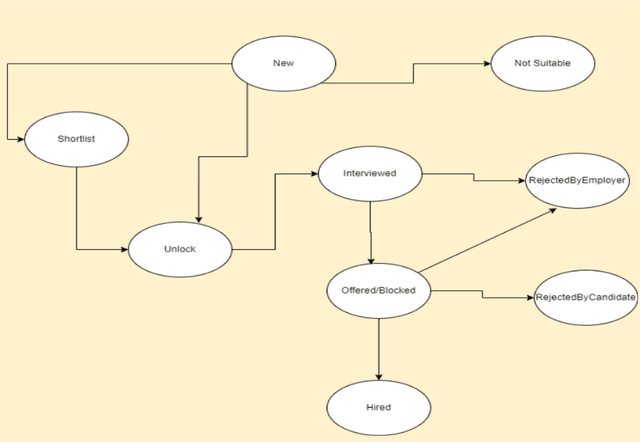
This program requires the employer / recruiter to update the status of hiring at our platform after the candidate has accepted the offer.
- No. You can see the matching candidates against your job posting
- You can then directly unlock them and contact them.
- You will also receive a daily email for 1 week with information about matching candidates and applicants for the job posting.
- Matching candidates are shown against each job posting
- Also, you get personalized emails every week with the matching candidates’ count and link for every posted job.
- No. Once a candidate is offered a job, they are not shown to other employers.
- But, candidates will have an option to accept/reject your job offer. In case, candidate accepts the offer, the candidate’s profile won’t be shown to other employers. But, if they reject the offer, they will be UNBLOCKED and will be again visible to everyone.
- Also, in case candidates do not take any action, then the job offer will be AUTO-REJECTED after 7 days. So, employers may have to tell the candidates to accept their job offer.
Though a notification is already sent to the candidate, you can also tell the candidate to accept the offer on our portal. Once, they accept the offer, their profile will remain hidden from other employers
- Yes. In case they accept the offer, we won’t show their profile to other employers. If they reject the offer, they will be UNBLOCKED and will be again visible to everyone.
- In case candidates do not take any action, then the job offer will be AUTO-REJECTED after 7 days.
Not right now, but planning to have a new skill level “Elite”, which will be allowed to get any number of offers
You can give multiple assessments of different skills in a month, but won’t be allowed to give an assessment of the same skill for 15 days.
15 days
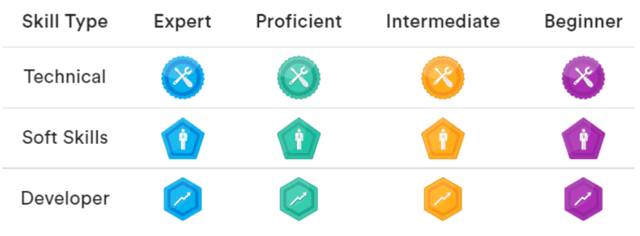
- Badges are given to candidates when they pass the assessments
- We provide three types of badges to candidate based on skill types, i.e.
- Technical (for technical skills like Java, DB etc)
- Developer (for devops, cloud, source control etc) also referred as “Development fundamental skill”
- Soft Skills (for email etiquettes, communication skills, business etiquettes skills etc)
- If a candidate gives multiple assessments of the same skill type, then the badge is given for the highest rating secured in all the assessments of the same type.
- Badges are given to candidates when they pass the assessments
- We provide three types of badges to candidate based on skill types, i.e.
- Technical (for technical skills like Java, DB etc)
- Developer (for devops, cloud, source control etc) also referred as “Development fundamental skill”
- Soft Skills (for email etiquettes, communication skills, business etiquettes skills etc)
- If a candidate gives multiple assessments of the same skill type, then the badge is given for the highest rating secured in all the assessments of the same type.